For about a year, example.com ran off a single t2.micro
EC2 instance with Nginx serving a static Astro build. It worked. It also meant
paying for a server, 24/7, to serve files that never changed unless I pushed a
new build — no database, no server-side rendering, nothing that actually needed
a running process. That's the part that eventually bugged me enough to fix it.
This post walks through moving that same Astro site off EC2 entirely, onto
Route 53 → CloudFront → S3, with a CloudFront Function doing the path rewriting
Nginx used to handle, and OAC locking the bucket down so only CloudFront can
read it. All domain names below are example.com / www.example.com
— swap in your own.
Why running a static site on EC2 is overkill
The old stack: an EC2 t2.micro running Nginx, serving the output of
astro build off local disk. Deploys were rsync plus an
Nginx reload. It's a completely reasonable way to get something online fast, and
for a while that's exactly what it was — but a static site has no business
needing a persistent server. There's no request that needs compute; every
response is just bytes on disk. EC2 for that job is buying a always-on machine
to do a job a CDN does better, cheaper, and without you managing an OS.
Prerequisites
- An AWS account
- A Route 53 hosted zone for your domain
- An Astro project with a static build output (
astro build→dist/)
The Problem with EC2 for Static Sites
Three specific things pushed me to move, beyond just "it feels wasteful":
- Always-on cost even with zero traffic. The instance bills by the hour whether one visitor or zero hit the site that day. A static site's traffic is bursty and unpredictable — you're paying for idle capacity most of the time.
- Single region, no CDN. Every visitor, regardless of where they are, hits the same EC2 instance in one AWS region. Someone on the other side of the world pays for that latency on every request, every asset.
- Single point of failure, no auto-scaling. One instance means one thing that can go down — an AZ issue, a bad patch, a full disk — and the whole site is offline. There's no redundancy unless you build it yourself, which for a static site is a lot of infrastructure for very little payoff.
The New Architecture
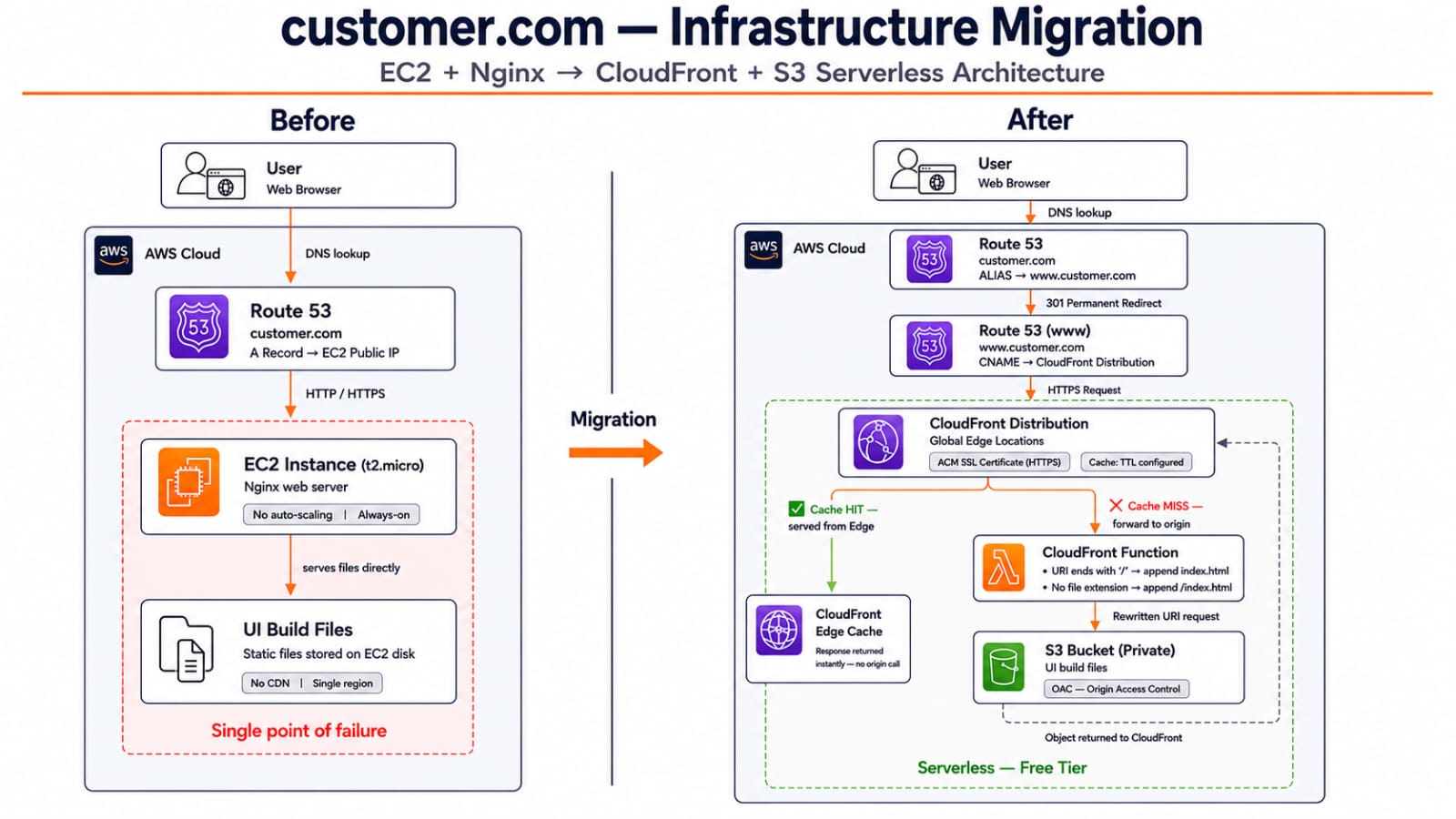
The replacement is entirely serverless: Route 53 → CloudFront → CloudFront Function → S3. Route 53 resolves the domain, CloudFront serves everything from edge locations worldwide with HTTPS via ACM, a CloudFront Function rewrites request paths at the edge before they hit the origin, and a private S3 bucket holds the actual build output.
DNS setup: why two Route 53 records
CloudFront distributions are given a *.cloudfront.net domain, and
the natural way to point a domain at one is a CNAME record. The
catch is the root/apex domain:
💡 Root domain CNAME limitation: DNS spec (RFC 1034/1035) doesn't allow aCNAMErecord to coexist with other records at the zone apex (example.comitself needsNSandSOArecords, among others). So you can't put a plainCNAMEstraight onexample.compointing at CloudFront — only on a subdomain likewww.example.com.
Route 53 works around this with an ALIAS record type, which behaves like a CNAME at the DNS protocol level but is legal at the zone apex. The setup ends up as two records:
example.com       →  ALIAS  →  www.example.com
www.example.com   →  CNAME  →  d123456789.cloudfront.net
example.com resolves via the Route 53 ALIAS to
www.example.com, which in turn CNAMEs to the CloudFront
distribution's domain. Both the bare domain and the www subdomain
end up served by the same distribution.
The Tricky Part: CloudFront Function for Astro
S3 is a key-value store, not a web server — it has no concept of "serve
index.html for a directory request" the way Nginx does by default.
Astro's static build outputs directory-style routes
(/about/index.html for a page at /about), and a
request for /about or /about/ needs to be rewritten to
the actual object key before it reaches S3, or the origin just 404s.
A CloudFront Function attached as a viewer-request handler on the default cache behavior does this rewriting at the edge, before the request is even routed to the origin:
function handler(event) {
    var request = event.request;
    var uri = request.uri;

    if (uri.endsWith('/')) {
        request.uri += 'index.html';
    } else if (!uri.includes('.')) {
        request.uri += '/index.html';
    }

    return request;
}
Breaking down the two conditions:
-
uri.endsWith('/')— the request already looks like a directory (e.g./about/). Appendindex.htmldirectly to get/about/index.html. -
!uri.includes('.')— the request has no file extension, so it's not a real asset request (a CSS file, an image) but a route without a trailing slash (e.g./about). Append/index.htmlto get/about/index.html.
Anything with a dot in the path — /assets/style.css,
/favicon.svg — falls through both conditions untouched, since
those requests already map to a real S3 object key.
S3 Bucket Security — OAC (Origin Access Control)
The S3 bucket should never be publicly readable. There's no reason for anyone to be able to hit the S3 URL directly — every request should go through CloudFront, where caching, HTTPS, and (if you add them later) access logs and WAF rules all apply. A public bucket bypasses all of that and gives you a second, uncontrolled way to serve your content.
Origin Access Control (OAC) is what lets CloudFront authenticate to a private S3 bucket on the viewer's behalf, using SigV4-signed requests, while the bucket itself stays fully private — no public access, no bucket website hosting endpoint needed. You attach an OAC to the CloudFront distribution's S3 origin, then update the bucket policy to allow only that specific distribution:
{
  "Version": "2012-10-17",
  "Statement": [
    {
      "Effect": "Allow",
      "Principal": { "Service": "cloudfront.amazonaws.com" },
      "Action": "s3:GetObject",
      "Resource": "arn:aws:s3:::example-com-bucket/*",
      "Condition": {
        "StringEquals": {
          "AWS:SourceArn": "arn:aws:cloudfront::123456789012:distribution/EXXXXXXXXXXXXX"
        }
      }
    }
  ]
}
Any request that doesn't come from that exact CloudFront distribution — a direct S3 URL hit, a request forged with a different distribution's ARN — gets denied.
ACM SSL Certificate
CloudFront needs an ACM certificate to serve the site over HTTPS on your custom domain, and it's free — no ongoing cost for the cert itself, just DNS validation (a CNAME record ACM gives you, added once to Route 53).
⚠️ The certificate must be requested in theus-east-1(N. Virginia) region — regardless of which region your other resources live in. CloudFront is a global service, and it only looks for ACM certificates inus-east-1when you attach one to a distribution. A cert requested in any other region simply won't show up as an option.
Once validated, attach the certificate to the distribution and set the
alternate domain names (example.com, www.example.com)
— CloudFront then serves valid HTTPS for both.
Cache HIT vs Cache MISS Flow
The first request for any given object is always a cache MISS: CloudFront has nothing at that edge location yet, so it forwards the request (through the CloudFront Function rewrite) to the S3 origin, fetches the object, returns it to the viewer, and stores a copy at that edge location according to the configured TTL.
Every subsequent request for the same object, from any viewer hitting that same edge location, is a cache HIT — CloudFront serves the cached copy directly from the edge, with no call back to S3 at all. That's the entire performance win: repeat traffic never touches the origin, and it's served from whichever edge location is geographically closest to the visitor, not from a single EC2 instance in one region.
Result
The end state is fully serverless: a global CDN in front of a private S3 bucket, no server to patch, no instance to keep running, no single region or single point of failure. For a landing-page-level traffic volume, it comfortably runs on the AWS free tier — S3 storage for a static build is a few cents at most, and CloudFront's free tier covers a meaningful amount of data transfer and requests per month. EC2 cost drops to zero.
Conclusion + Key Takeaways
- A static site almost never needs a running server — EC2 is the wrong default for it.
- The root domain CNAME limitation is a DNS spec rule, not an AWS quirk — Route 53's ALIAS record is the standard workaround.
- Astro's directory-style static output needs explicit path rewriting at the edge; a CloudFront Function is the cheapest place to do it.
- OAC replaces the older, messier "public bucket" or "Origin Access Identity" patterns for keeping S3 private behind CloudFront.
- ACM certificates for CloudFront must live in
us-east-1, no exceptions — this trips up almost everyone the first time.
If you're serving a static site from EC2, this migration takes less than a day.