After finishing AWS SAA-C03, I wanted a project that would force me to actually use the services I'd just studied — not a toy Lambda hooked up to a single route, but a real product with auth, a data model, rate limits, and a domain that real people could hit. A QR code generator and URL shortener fit: simple enough to scope in a weekend, complex enough to need Cognito, API Gateway, Lambda, DynamoDB, S3, and CloudFront all working together — and free-tier friendly enough that running it costs nothing.
The result is live at qr.balakrishnan.me. Source is on GitHub. Everything below is what actually happened building it — including the three bugs that took the site fully offline after what looked like a clean deploy.
What it does
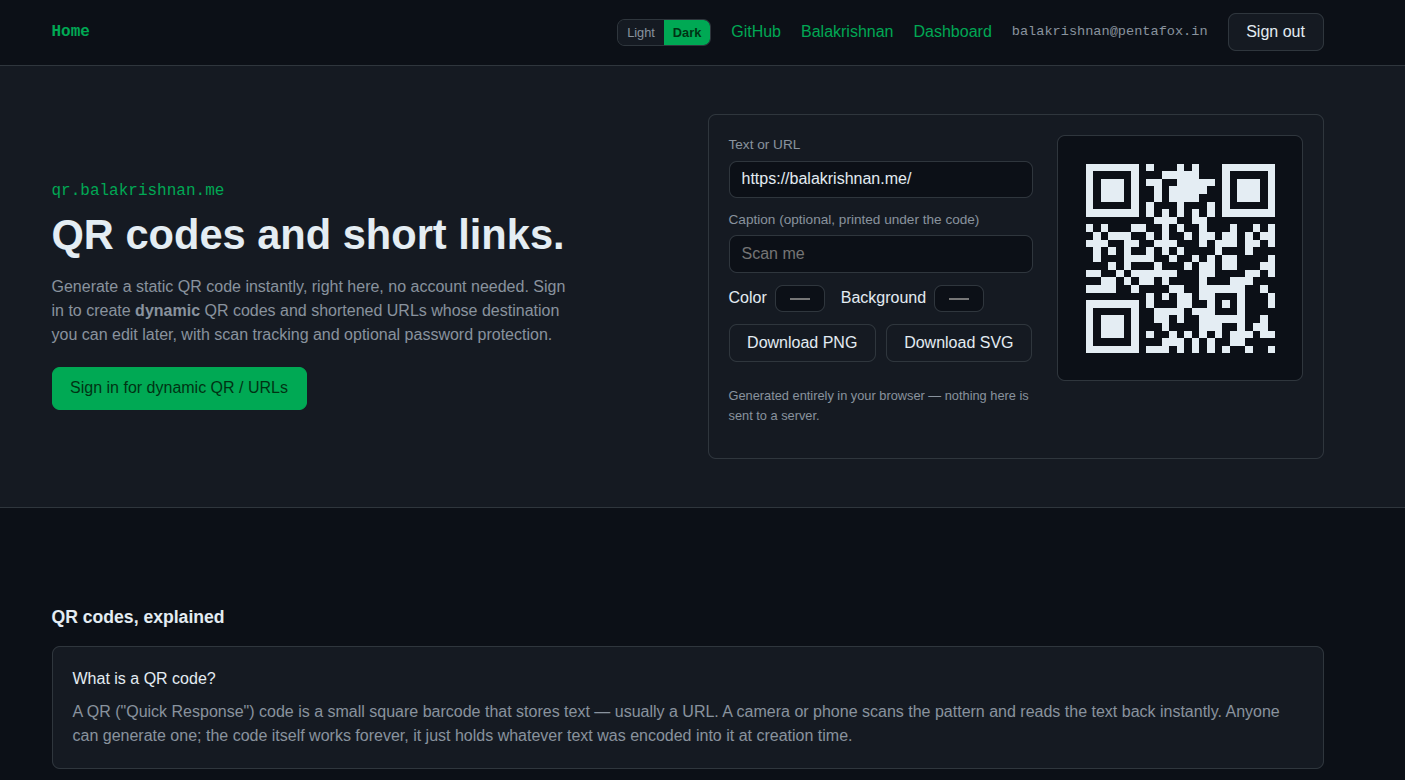
- Static QR codes — generate one for any text/URL, no account, entirely client-side. Nothing ever touches a server.
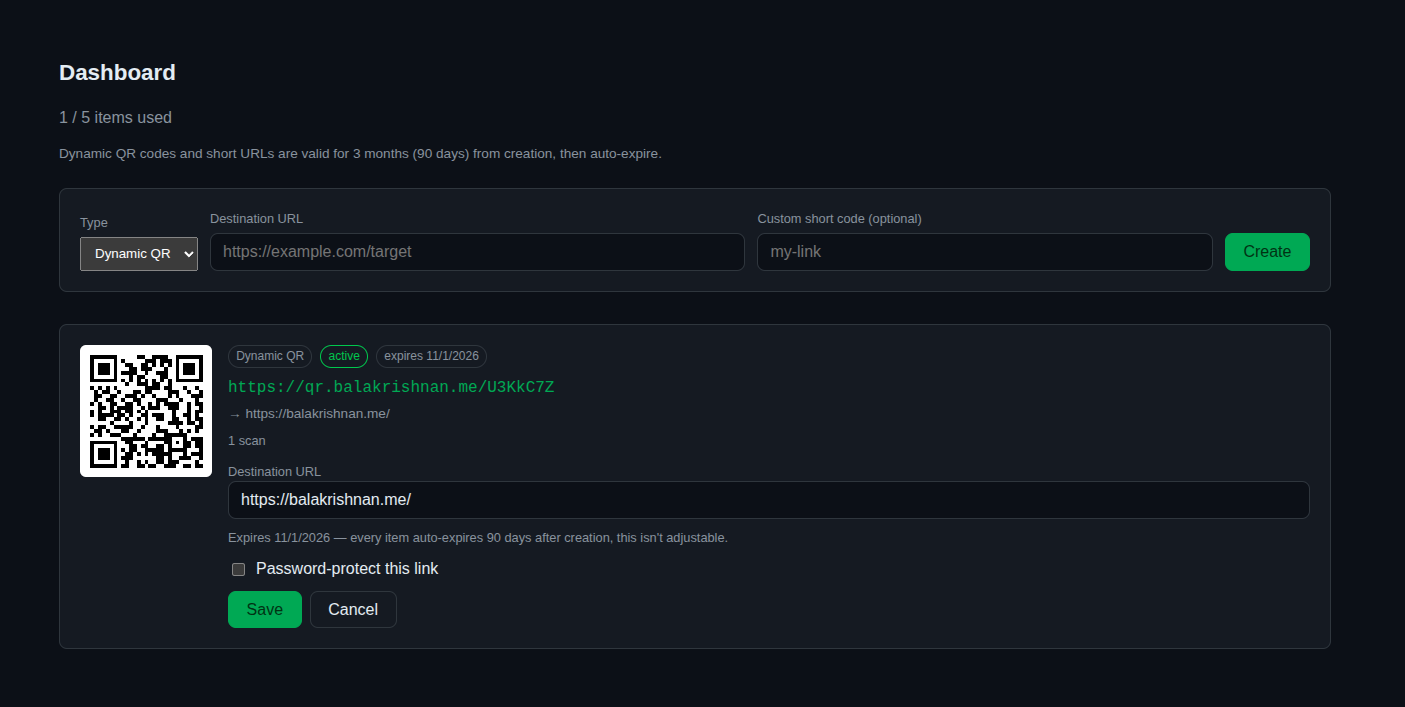
- Dynamic QR codes & short URLs — sign in (passwordless, email OTP) to create a link whose destination you can edit later without reprinting the code. Optionally pick your own short code instead of a random one.
- Scan tracking, password protection, active/inactive toggle, and a fixed 90-day auto-expiry with a reminder email 10 days out.
- A hard 5-item cap per account — a fair-use limit for a free hobby tool, enforced server-side.
What it actually looks like, live:
Architecture
The core decision: one CloudFront distribution for everything,
frontend and backend both, split by path. Short links need to live at the
domain root (qr.balakrishnan.me/AbC123, not
qr.balakrishnan.me/r/AbC123) — that's the whole point of them
being short — so there's no clean way to give the API its own subdomain
without also managing a second cert and dealing with CORS. Instead, CloudFront
routes explicit paths (/login, /dashboard,
/assets/*) to an S3-hosted React SPA, sends /api/* to
API Gateway, and — critically — falls through to API Gateway by default for
everything else, since an unrecognized single-segment path is exactly
what a short code looks like.
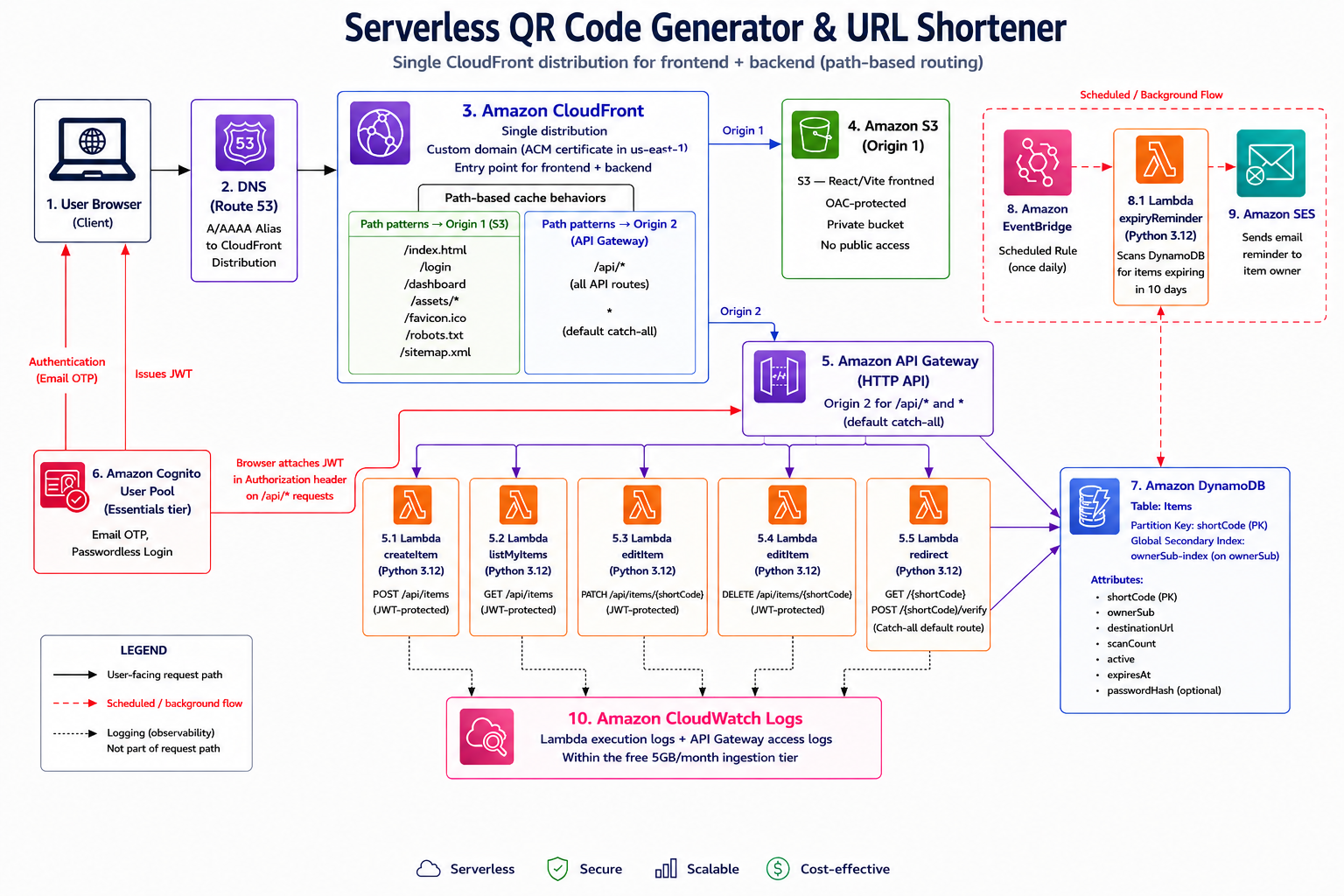
Auth is a Cognito User Pool (Essentials tier) using the newer
EMAIL_OTP passwordless flow — no password to manage, no SES setup
required just to get started (Cognito's built-in emailer covers the first 50
logins/day for free). Five Python Lambdas do the work:
createItem, editItem (handles both edit and delete),
listMyItems, redirect (the public route every scan
hits), and expiryReminder (not behind API Gateway at all — it's
invoked daily by EventBridge). One DynamoDB table, partition key
shortCode, with a GSI on ownerSub for the dashboard
and the 5-item-limit check.
Three bugs that took the whole site down
The infrastructure looked correct in the console. The site was still completely broken on first deploy — every route either 403'd or 500'd. Here's what was actually wrong, because none of these are obvious from the AWS docs alone.
1. The Lambda handler was never actually pointing at the code
Pasting Lambda source into the console's inline editor doesn't rename the
file — it stays lambda_function.py even though the repo's source
lives in handler.py with a function called handler.
Setting Runtime settings → Handler to handler.handler
(matching the repo) fails at invoke time:
[ERROR] Runtime.ImportModuleError: Unable to import module 'handler': No module named 'handler'
Every single API call was crashing before running any application code. The
fix is to set the handler to lambda_function.handler — matching
the file's actual name in the deployed package, not the source repo's
filename.
2. CloudFront was forwarding the wrong Host header
Even after fixing the handler, /api/* calls returned a generic
403 Forbidden — indistinguishable at a glance from a JWT
authorizer rejection, right down to matching error shape
({"message": "Forbidden"}). The real cause: the origin request
policy on those CloudFront behaviors was Managed-AllViewer, which
forwards the viewer's original Host header
(qr.balakrishnan.me) straight through to API Gateway. API
Gateway's default execute-api endpoint rejects any request whose
Host doesn't match its own domain — a security default, not a bug
— so a perfectly valid JWT still got a 403. Swapping to
Managed-AllViewerExceptHostHeader (forwards everything else,
lets CloudFront set the correct Host) fixed it.
3. The root URL never matched its own CloudFront behavior
qr.balakrishnan.me/ and /index.html both fell through
to the API Gateway default behavior instead of serving the S3-hosted SPA. The
behavior's path pattern was literally / — which looks like it
should match the root, but doesn't. CloudFront's DefaultRootObject
setting rewrites a request for the bare root to /index.html
before matching cache behaviors, so a behavior patterned exactly
/ never actually matches a real root request. The fix is to
pattern the behavior /index.html instead, and let
DefaultRootObject handle the root-to-index-page mapping.
boto3's DynamoDB resource
returns numeric attributes as Python Decimal, which the stdlib
json module can't serialize — listMyItems and
editItem both needed a small custom JSONEncoder to
avoid a 500 on every list/edit call.
A design detail worth calling out: custom short codes
Letting users pick their own short code (qr.balakrishnan.me/my-link
instead of a random 7-character string) needed two things: a validated charset/
length, and a way to avoid two concurrent requests both claiming the same code.
DynamoDB's conditional writes solve the second problem cleanly —
PutItem with ConditionExpression: attribute_not_exists(shortCode)
fails atomically if the code already exists, no separate read-then-write race
window. The Lambda also rejects a fixed set of reserved paths
(login, dashboard, api, etc.) — a short
code matching one of those would never actually be reachable, since CloudFront
routes it to the SPA before it ever reaches the redirect Lambda.
Auth implementation note
The plan was to use amazon-cognito-identity-js for the frontend
auth calls. It turned out to predate Cognito's USER_AUTH/
EMAIL_OTP challenge flow, so it can't drive it. The frontend
instead calls the Cognito IDP endpoint directly with raw fetch() —
no SDK, no Amplify — implementing SignUp, ConfirmSignUp,
InitiateAuth, and RespondToAuthChallenge against the
documented JSON-RPC-style API. One UX consequence: a brand-new email needs two
codes in sequence on first sign-in (a signup confirmation code, then the actual
login OTP), since the pool has no custom Lambda triggers to collapse that into
one step.
Stack
- Frontend: React (Vite), deployed as a static site to S3, served through CloudFront.
- Backend: Python 3.12 Lambdas behind an HTTP API (API Gateway), one function per concern, least-privilege IAM per function.
- Auth: Cognito User Pool, Essentials tier, email-OTP passwordless.
- Data: DynamoDB, single table, one GSI.
- Infra: Built entirely via the AWS Console — no CDK, no Terraform. Deliberate: the goal was hands-on familiarity with the console workflow, not IaC practice.
Full writeup of the architecture, data model, and API reference is in the repo's docs/architecture.md, including the exact fixes above. If you're deploying this yourself, the backend-setup guide walks through every console step and calls out each gotcha inline, so you don't have to rediscover them the hard way.